- Document

API Gateway 의 데이터를 백업 및 복원 하려면 Linux 기준
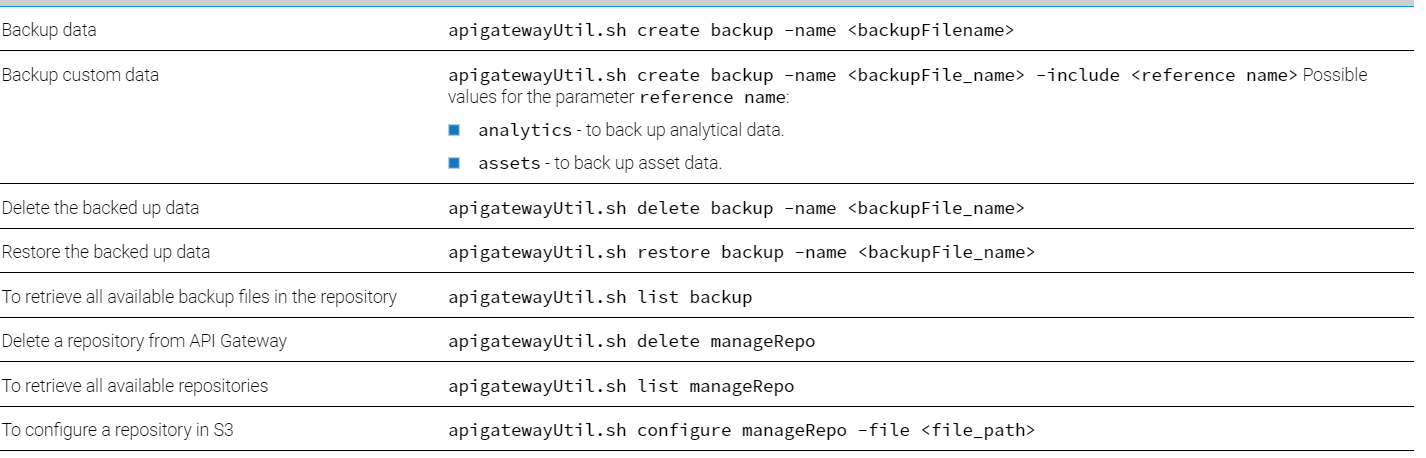
.../IntegrationServer/instances/default/packages/WmAPIGateway/cli/bin 아래apigatewayUtil.sh파일 사용

10.7 기준 API Gateway 의 백업 지원 플랫폼
- NFS(네트워크 파일 시스템)
- Amazon Simple Storage Service (S3)
- Amazon S3 스토리지 플랫폼 사용하려면 , .../InternalDataStore/bin/elasticsearch-plugin install repository-s3 후 Integration Server Restart

- NFS 스토리지 플랫폼 사용
- 백업하기
- pwd >> ../IntegrationServer/instances/default/packages/WmAPIGateway/cli/bin
- 명령 >> ./apigatewayUtil.sh create backup -name {backup_file_name}
- 백업 된 파일은 ../InternalDataStore/archives/default 아래 저장.
- 복원하기
- 백업 데이터를 복원 할 instance의 ../InternalDataStore/archives/ 디렉토리에 붙여넣기
- pwd >> ../IntegrationServer/instances/default/packages/WmAPIGateway/cli/bin
- 명령 >> ./apigatewayUtil.sh restore backup -name {backup_file_name}
- 백업이 복원되면 API Gateway 의 instance를 Restart 해야 함.


- 테스트 전제 조건 외 주의 점
- ./apigatewayUtil.sh 실행 시에 sudo로 실행 (nfs 권한 문제)
- NfS-Server 의 APIM과 Client의 APIM이 모두 구동 되어있는 상태에서 configure -> create backup -> restore backup 실행 해야함
- backup - restore 할 두 API Gateway 의 Fix Version 이 동일해야 함
리눅스 NFS 설정..
- NFS 관련 자료
- nfs 설치 (centos7)
- nfs 설정(Centos7)
74 Server Setting (NFS Server)

vi /etc/exports 설정

223 Server Setting (NFS Client)

<에러 예시>

.....에러 발생 => 서버가 구동 되어 있지 않아서 생기는 에러인 듯?
[sol@192 bin]$ ./apigatewayUtil.sh configure fs_path -path /nfstest
Current Path: /webM/IntegrationServer/instances/default/packages/WmAPIGateway/cli/bin
Exception in thread "main" java.lang.NullPointerException
at com.softwareag.apigateway.utility.util.BackupAndRestoreUtil.getESClient(BackupAndRestoreUtil.java:269)
at com.softwareag.apigateway.utility.processor.NFSConfigurationProcessor.apigatewayConfigNFSPath(NFSConfigurationProcessor.java:52)
at com.softwareag.apigateway.utility.processor.NFSConfigurationProcessor.process(NFSConfigurationProcessor.java:41)
at com.softwareag.apigateway.utility.initializer.APIGatewayUtilityStartup.main(APIGatewayUtilityStartup.java:50)
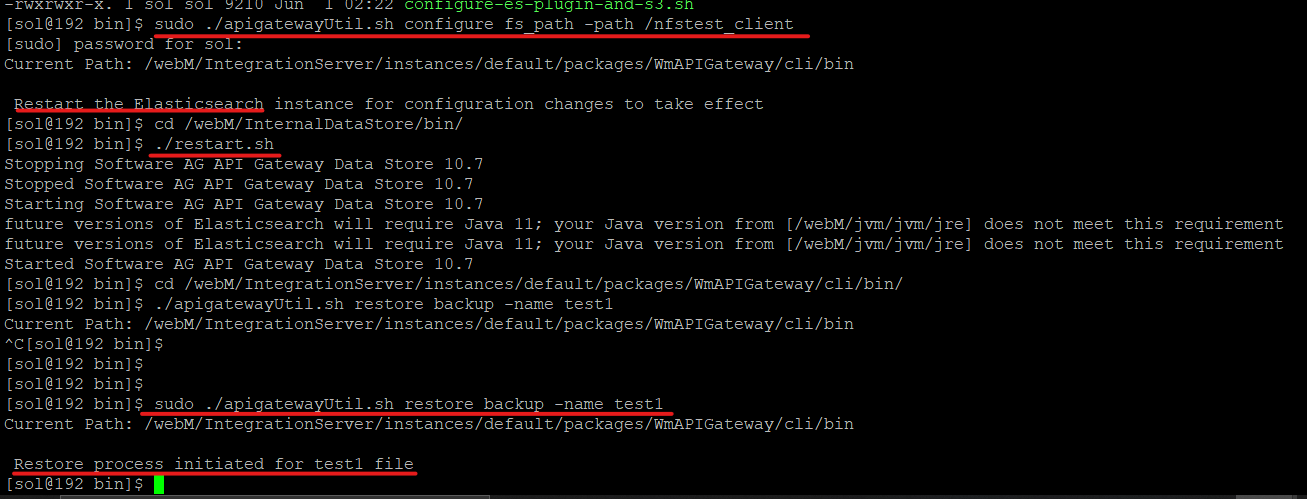
서버 구동하고 ./apigatewayUtil.sh configure fs_path -path {/dir} 후 서버 Restart

테스트 용 API 생성

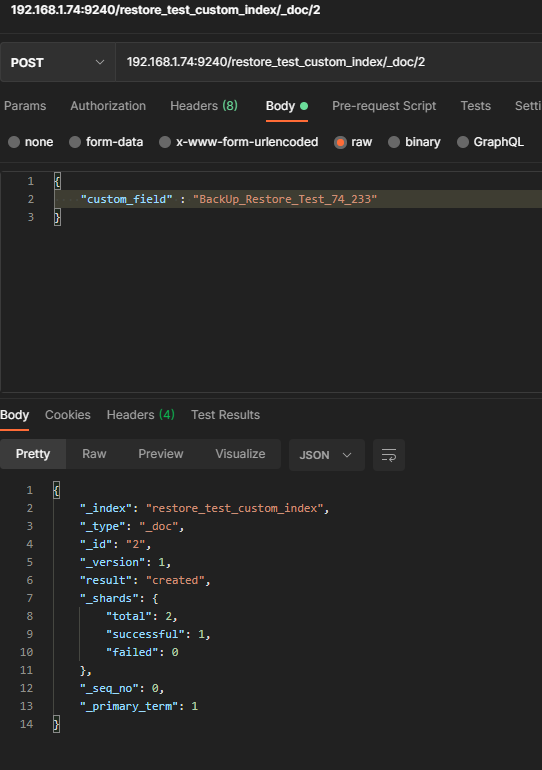
Custom Index 생성 및 데이터 입력


Restore (74) 서버 -> 에러..

Error while creating snapshot - default-2021-july-5-20-19-24-452000000, repository - default. Message - [default] Could not read repository data because the contents of the repository do not match its expected state. This is likely the result of either concurrently modifying the contents of the repository by a process other than this cluster or an issue with the repository's underlyingstorage. The repository has been disabled to prevent corrupting its contents. To re-enable it and continue using it please remove the repository from the cluster and add it again to make the cluster recover the known state of the repository from its physical contents
sudo 로 path 지정 -> Elasticsearch restart -> sudo test1 backup

Restore (233)
결과

API는 Restore 됨
Custom Index는 Restore 안됨..


- Amazon S3 스토리지 플랫폼 사용
- AWS S3 기본 개념 정리
....> custom index 는 백업 안될 것 같은데
명령어 정리